EECS 498 System Design of a Search Engine
Winter 2026
This is a frozen archive of my course materials from winter 2026. I have since left the university.
Instructor
Nicole Hamilton
nicole@nicolehamilton.com
C: 425-765-9574
Office hours Tuesdays and Thursdays, 3:00 pm to 4:00 pm
Staff
Christopher Davis
Rickey Dong
Lectures
Tuesdays and Thursdays, Dow 1017
Section 005: 12:00 pm to 1:30 pm
Section 012: 1:30 pm to 3:00 pm
Lectures will be recorded but attendance is strongly advised as lectures and labs will also
serve as your team meetings.
Labs
Fridays, IOE 1610
Section 051 (goes with 005): 3:30 pm to 5:30 pm
Section 121 (goes with 012): 1:30 pm to 3:30 pm
Labs will also be recorded.
Details
| Syllabus |


|
| Schedule |

|
| Edstem | https://edstem.org/us/courses/89542/discussion |
| Autograder | https://autograder.io/web/course/358 |
| Midterm | February 26,2026 |
| Final | April 29, 2026 |
| Prerequisite | EECS 281 |
| Credit hours | 4 |
| Classification based on your major: | |
| CE | MDE or EECS elective |
| CSE | MDE or Flex Tech elective |
| CS-LSA | Capstone or Flex Tech elective |
| EE and DS | Flex Tech elective |
Overview
This is a course in how to tackle a large system programming project in C++. Students will work in teams of 6 to write a complete internet search engine from scratch.
My objective is to offer students an opportunity to work on a significant relatable design project (something you can explain to your family and to recruiters) early in your careers. I want the experience to be like working on the startup dev team for a new product (like the one I had on the startup team for what became the Bing engine.) I hope this class will help you get a job.
Fifty percent of your grade will be on the project, evenly split between your team’s performance compared to others and your individual contribution to your team. Thirty percent of your grade will be on the exams. Twenty percent is homework.
Engines submitted in the past have ranged in size. The largest have been around 20 KLOC, but the average has been around 6 KLOC. (Yes, a little smaller than you might have guessed.) Sounds easy (maybe) but there’s more ambiguity and you’ll be working on a larger team than in most classes.
This will be the sixth time for this course after a four-year hiatus, so the content is finally pretty stable. Students reported being very satisfied last time in their W25 course evals
Learning objectives
Here is what I hope you will get from the class.
-
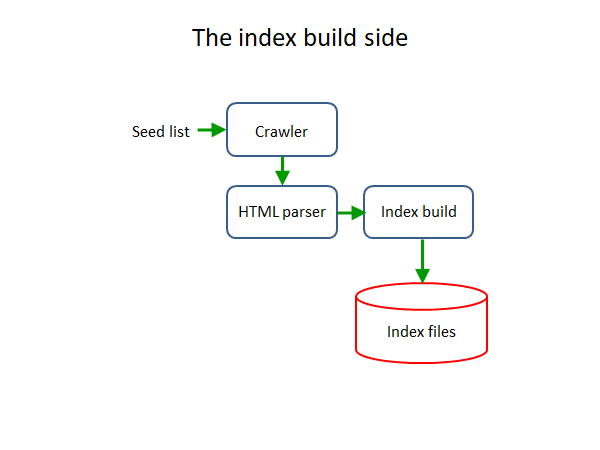
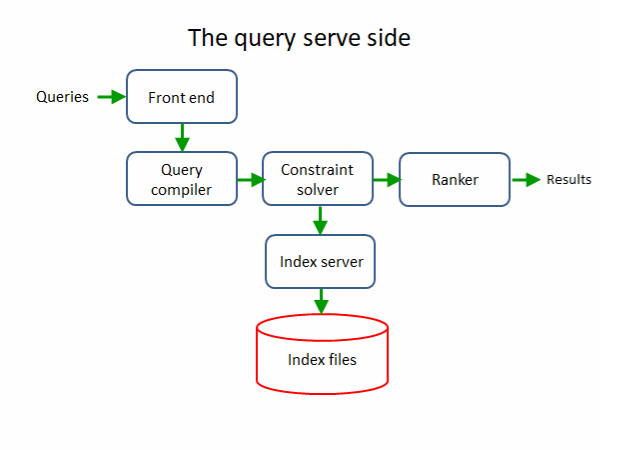
The experience of working on the startup dev team for a significant project in C++, building a complete distributed multithreaded internet search engine from scratch.
-
The knowledge, skills and ability to work with others to research, define, estimate, plan and carry out the design of such a large, complex software project, especially, one you don’t already know how to do.
-
An understanding of how a large system is decomposed into separable parts with interfaces exposing a limited surface area and how they talk to each other.
-
An understanding of how a search engine works and how its parts talk to each other.
-
An understanding of and ability to use the low-level operating system facilities for the file system, process and thread creation, synchronization, IPC and sockets.
-
How to distribute a system across multiple machines to break up a problem that’s too big for one machine.
-
An appreciation of software as art and of the software design process as a fundamentally creative activity where you make choices.
-
The ability to communicate your results by demonstrating your product, producing a final report and presenting your work to the class and invited guests in a professional manner.
-
Exposure to various other topics related to the practice of engineering including professional ethics, organization behavior, negotiations, and the social impact of technology.
Lectures
The course is broken roughly into thirds. The first third covers the Linux OS facilities we'll use. The middle third explains how each piece of the engine works. The final third is devoted to professional growth while you build your engines.
|
1. |
Intro to System Design of a Search Engine |
|
|
2. |
Search engine basics |
|
|
3. |
Project planning |
|
|
4. |
HTML Utf8 HTTP redirects |
|
|
5. |
Intro to the filesystem |
|
|
6. |
Hashing and serializing data |
|
|
6. |
Mapped files and hashing |
|
|
7. |
Memory-mapped hash tables |
|
|
8. |
Processes and threads |
|
|
9. |
Locks and condition variables |
|
|
10. |
Tcp-Ip DNS sockets |
|
|
11. |
SSL |
|
|
12. |
LinuxTinyServer |
|
|
13. |
The index and constraint solver |
|
|
14. |
The constraint solver |
|
|
15. |
The frontier and robots.txt |
|
|
16. |
The query compiler |
|
|
17. |
Ranking |
|
|
18. |
Sitemaps and shingles |
|
|
19. |
Ethics |
|
|
20. |
The Citicorp crisis and Backdoor to the iPhone |
|
|
21. |
Negotiations |
|
|
22. |
Organizational behavior |
|
|
23. |
Time value of money |
|
|
24. |
Intellectual property and Marketing |
|
|
25. |
Review and reflections |
 5
5

Labs
|
1 |
Speed dating |
|
|
2 |
Introduction |
|
|
3 |
Developer Workflow |
|
|
4 |
CMake |
|
|
5 |
GTest |
|
|
6 |
IP and Webpages |
|
|
7 |
Midterm review |
|
|
8 |
Check In |
|
|
9 |
Design Choices |
|
|
1 |
Intro to Google Cloud |
|
|
11 |
Google Cloud Continued |
Autograder assignments
Each assignment is worth 100 points. The first assignment is an individual assignment. The rest are group. The zips contain starter files.
Contact me if you're an instructor and would like access to my solutions or test cases.
-
Most positive subsequence

You are to write a function that finds the most positive subsequence in an array of ints and a simple wrapper to allow it to be tested. You are also asked to upload a screenshot of your graphical debugger.
-
String and vector
You are to create simple string and vector templates and submit them to the autograder.
-
Utf8
You will create means of encoding and decoding Utf8 characters to be submitted to the autograder.
-
HTML parser
Given the starter code, you are to implement the HtmlParser class and the LookupPossibleTag( ) function and submit to the autograder.
-
HashTable and Top10
You are to create simple hash table template, then use it to create a function and wrapper utility that can report the top N most frequent words in a text file.
-
HashBlob and HashFile
You are to create a HashBlob, a serialization of a HashTable that can be written to a file as a still-working hash table.
-
Multithreaded file operations
This assignment will ask you to create a couple of simple multithreaded programs, exposing you to the pthreads library.
-
LinuxGetUrl
You are to create a command-line utility to read web pages using HTTP.
-
LinuxGetSsl
You are to create a command-line utility to read web pages using HTTPS and SSL.
-
LinuxTinyServer
You will complete the design of LinuxTinyServer, a simple Linux web server and submit it to the autograder.
-
Bloom filter
You will create a Bloom filter.
-
Robots.txt
You are to implement a RobotsTxt class that can compile a robots.txt file to extract the rules and any sitemaps and test whether a user is allowed access.
-
Expression parser
You will be asked to create a simple expression parser and interpreter to be submitted to the autograder.
Individual assignments
Each assignment is worth 100 points.
-
Introduce yourself
Please tell me a little bit about yourself and include a recent picture.
-
Gantt chart
You are to create a Gantt chart showing a plan to apply to graduate school.
-
Join a team
Join with others to form a team of 6 and pick a name for yourselves.
-
Rate the group photos
You are asked to fill out a survey rating the group photos.
-
Rate the team presentations
You will need to physically attend at least one session each day and fill out a survey rating the presentations you watched.
-
Rate your teammates
You are asked to give your honest, candid assessments of your teammates' contributions to your team and what it's like to work with them.
Group assignments
Each assignment is worth 100 points except the final report, worth 250, and your engine's functionality, worth 500.
-
Group photo
You are to form groups of 6, choose a name for your group and submit a photo of yourselves. Your grade will be based on a survey of the class.
-
Project plan
You are to submit a plan for your project as a PDF.
-
Presentation
You are to prepare and deliver a 30-minute presentation of the results from your project to the class. You must demo. Your grade on the presentation will be determined by survey.
-
Final reports
You are to submit a final report on your project.
-
Project archive
You are to upload a complete final archive your project. It should include all your code, sensibly organized with helpful readmes.
-
Search engine functionality
Please fill in the column describing your engine on a shared Google spreadsheet represented here as an Excel spreadsheet. The rubric information was hidden.
Exams
Each exam is worth 100 points. Both are in-class. The midterm is mandatory but the final is optional. If you choose not to take the final or if you score less than on your midterm, I will use your midterm score.
-
Midterm
Exam
Solution
-
Final
Exam
Solution
Resources
|
1. |
Dennis Ritchie and Ken Thompson, "The UNIX Time-Sharing System", Communications of the ACM, July 1974. |
|
|
|
2. |
Bell System Technical Journal, UNIX Time-Sharing System issue, July-August 1978. (Requires you to create a free account.) |
|
|
|
3. |
Marc Nayork and Allan Heydon, "High Performance Web Crawling", describing Mercator. Compaq Systems Research Center, September 26, 2001. |
|
|
|
4. |
Mike Burrows, "AltaVista Architecture and Indexing", January 18, 2000, lecturing at the University of Washington Seatte. (Slides viewable on Slideshare.) |
|
|
|
5. |
Andrei Z. Broder, "Identifying and Filtering Near-Duplicate Documents", COM '00: Proceedings of the 11th Annual Symposium on Combinatorial Pattern Matching", June 21, 2000. |
|
|
|
6. |
Nicole Hamilton, "Dynamic Ranking", circulated internally at Microsoft, November 2004. |
|
|
|
7. |
Example forms plugins for the LinuxTinyServer. One uses POST, the other uses GET. |
|
|
|
8. |
Christopher D. Manning, Prabhakar Raghavan, and Hinrich Schütze, Introduction to Information Retrieval, Chapter 19, "Web search basics", Cambridge University Press, 2009. (Also archived here.) |
|
|
|
9. |
Stefan Büttcher, Charles L. A. Clarke, and Gordon V. Cormack, Information Retrieval: Implementing and Evaluating Search Engines, MIT Press, 2010. (Sorry, no free copy is available on the web.) |
Reflections
This what I wrote in May for my lecturer evaluation, right after W26 ended. Sadly, there is no next time.
Every time I teach a class, I think about how I can make it better. This time I made a lot of improvements to my autograder assignments, to my lecture content, and in other ways. The engines students demonstrated were some of the best ever and I was delighted by my course evals.
I now have 13 fairly serious autograder assignments students split up as a team covering most of the basics of what they need to know to build the index build and index serve sides of a distributed search engine completely from scratch in C++. This time, I made major improvements to the UTF-8, multi-threading, and HTML parsing assignments, added a new Robots.txt parser, and made more improvements to the rest. If I get to teach this again, I would like to improve the expression parser and Bloom filter assignments and add one to implement an index and constraint solver.
In lecture, I did a better job of helping students get started on a large project, e.g., what might the source tree look like, defining interfaces in headers, and using stubs for pieces that don't exist. I improved my discussion of UTF-8, the frontier, condition variables, and robots.txt, and finally explained how to create GET and POST plugins to the web server they build as a front-end. I also did a better job of explaining that even though indexing URLs is difficult because it requires word-breaking, it's not impossible with a dictionary. If I get to teach this again, I would like to further improve my discussion of the frontier, politeness, and how ISRs (index stream readers) are implemented.
In lab, my staff created and led several very helpful sessions on getting started with debugging, repositories and test frameworks, and GCP.
I also gave students better direction, sometimes in trivial ways. For example, I never explicitly required they include a screen shot of their engine in their final reports. Personally, if I'm explaining my web app, I'm going to include a screenshot. But that's apparently just me; it doesn't occur to students. No team in any previous term has ever included a screen shot in their final reports. So this time, I required them and I got them. In presentations, they would hand the hand the mic to someone standing in the corner. Now, my instructions ask that whoever's speaking step to the front. Otoh, I also insisted that any text on a slide has to be really large. That part they didn't hear and I'll have to say it louder next time.
I was super proud that perhaps half the engines this time were better than the best in previous terms. Several teams implemented word-breaking and indexing of URLs. Several teams successfully indexed anchor text. Several teams used my span algorithm in their rankers. (But I was a little disappointed that my ban on tf-idf, a lame bag-of-word technique, was thwarted by many teams using BM25, an only slightly less lame BOW technique.)
If I get to teach this again, I would add a mid-semester check-in just before the break where the teams will need to be able to demonstrate some sort of rudimentary crawler that can download a few hundred pages.